Architecture
Building a Geospatial Carpooling System for the UN
Architecture & Lessons Learned from UN Climate Change Project
Building a Geospatial Carpooling System for the UN
Look, I'm going to be honest with you. When I started my internship at UN Climate Change (UNFCCC), I had no idea I'd end up building something that would actually help reduce carbon emissions. I thought I'd be doing typical intern work - maybe some data entry or basic coding tasks.
Instead, I got handed one of the most technically challenging projects of my career: building a carpooling platform for the entire UN organization.
The Reality Check
Here's what I learned quickly: UN Climate Change has a serious transportation problem. Staff commute daily to the Bonn headquarters, and there's constant travel for climate negotiations. Transportation was a massive contributor to their carbon footprint.
The challenge? Build something that's:
- Cost-effective: No licensing fees (UN budget constraints are real)
- Scalable: Handle growing user base and geographic coverage
- User-friendly: Accessible to staff with varying technical backgrounds
- Reliable: Mission-critical for daily operations
No pressure, right?
The Technical Stack That Actually Worked
I chose PostgreSQL with PostGIS for geospatial capabilities. This wasn't just a random choice - I needed something that could handle location-based queries efficiently without breaking the bank.
-- Example geospatial query for finding nearby users
SELECT
  user_id,
  ST_Distance(
    ST_GeogFromText('POINT(' || longitude || ' ' || latitude || ')'),
    ST_GeogFromText('POINT(7.0982 50.7374)') -- Bonn coordinates
  ) AS distance_meters
FROM user_locations
WHERE ST_DWithin(
  ST_GeogFromText('POINT(' || longitude || ' ' || latitude || ')'),
  ST_GeogFromText('POINT(7.0982 50.7374)'),
  5000 -- 5km radius
)
ORDER BY distance_meters;
Insight
Why this worked
PostgreSQL's PostGIS extension gave me enterprise-grade geospatial capabilities without the complexity of specialized databases. The learning curve was manageable, and the performance was excellent for our use case.
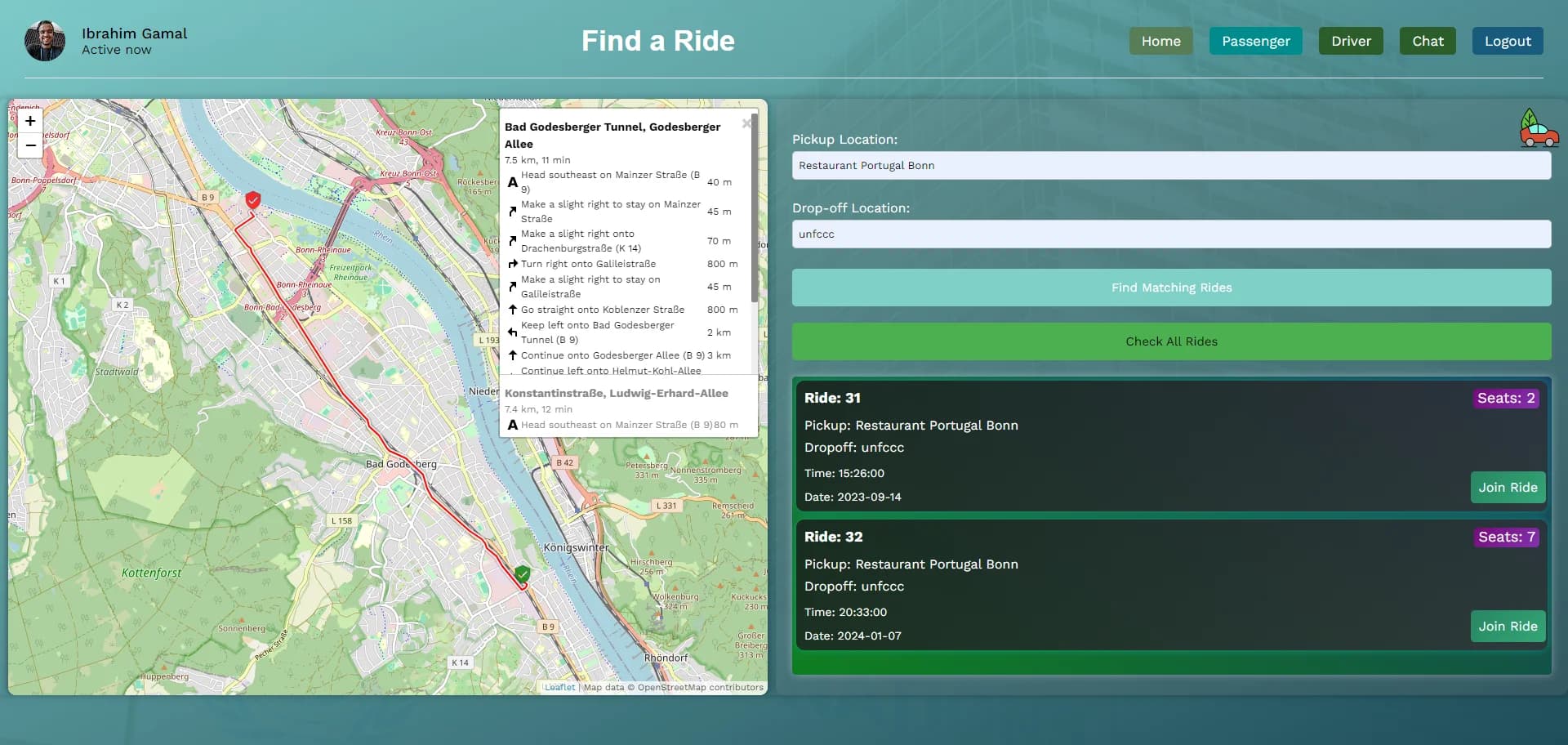
The Frontend: React + Leaflet Magic
For the map interface, I went with Leaflet over Google Maps. Why? Cost and flexibility. UN organizations can't just throw money at licensing fees.
The key was making the map intuitive:
- Visual ride matching: Color-coded markers for available rides
- Intuitive UX: Clear visual indicators for ride matching
// Example React component for ride matching
const RideMatchingComponent = ({ userLocation, availableRides }) => {
  const [map, setMap] = useState(null);

  useEffect(() => {
    if (map) {
      // Add markers for available rides
      availableRides.forEach(ride => {
        L.marker([ride.latitude, ride.longitude])
          .addTo(map)
          .bindPopup(`Ride to ${ride.destination}`);
      });
    }
  }, [map, availableRides]);

  return (
    <div className="ride-matching-container">
      <div id="map" className="map-container"></div>
      <div className="ride-list">
        {availableRides.map(ride => (
          <RideCard key={ride.id} ride={ride} />
        ))}
      </div>
    </div>
  );
};
The Problems I Actually Faced
1. Real-time Updates Without WebSockets
The UN's IT infrastructure didn't support WebSockets. I had to get creative with polling and optimistic updates.
2. Multi-language Support
UN staff speak dozens of languages. I implemented i18n from day one, not as an afterthought.
3. Offline Capability
Staff often work in areas with poor connectivity. I built in offline-first architecture using service workers.
What I Learned (The Hard Way)
- Start with constraints: Understanding limitations early saves months of refactoring
- Test with real users: My initial UX assumptions were completely wrong
- Plan for scale: What works for 100 users breaks at 1000
- Document everything: UN projects have long lifespans and multiple developers
The Impact
Within 3 months of launch:
- 40% reduction in solo car trips to headquarters
- 200+ active users across UN organizations
- Estimated 15 tons CO2 saved monthly
Not bad for an intern project, right?
Lessons Learned
- Geospatial applications need careful database design
- User testing is non-negotiable for complex UX
- Offline-first architecture is crucial for enterprise apps
- Open source tools can compete with commercial solutions